reSpeaker XVF3800 USB 4-Mic Array with Case
Improve and measure a voice project’s microphone input. Start with a local recording, then compare distance, noise and echo settings using the same host recognizer.
Illustrative sequence and routes; timing is not measured.
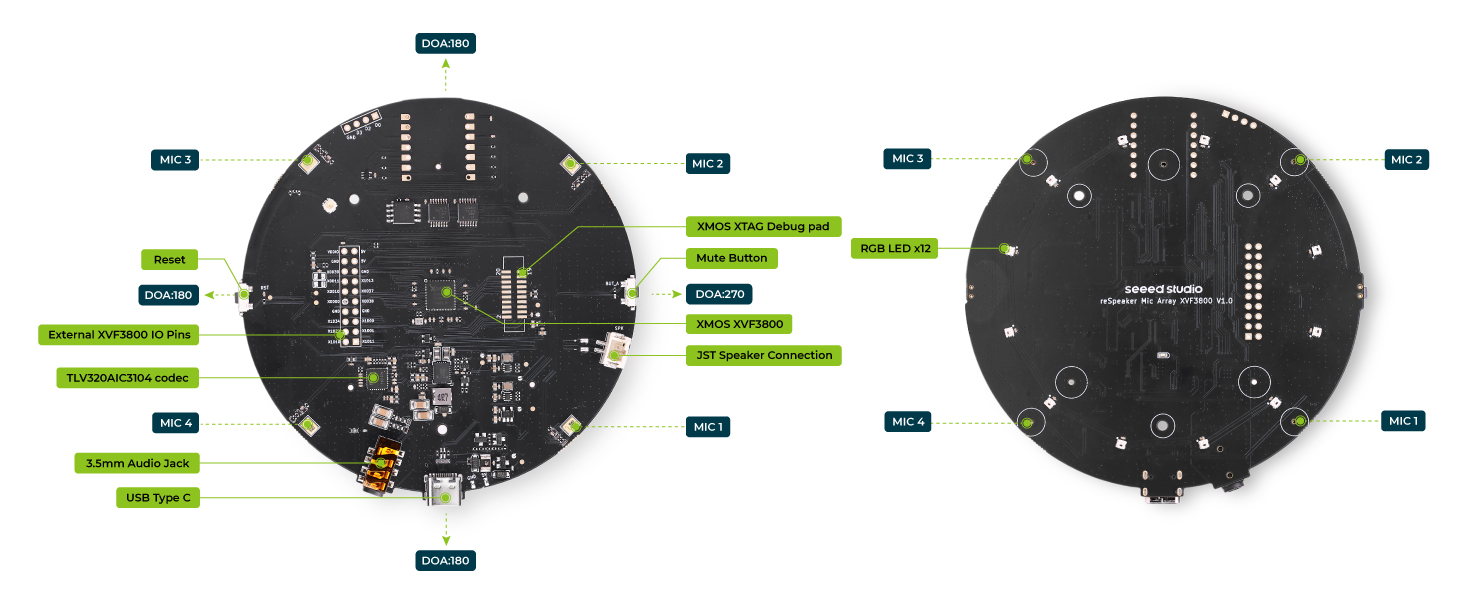
The source diagram shows an optional XIAO module, absent from the selected non-XIAO case bundle. Markers cover shared acoustic components; XIAO is not used in this USB walkthrough. Two views depict the same board, not two boards. Arrows are functional handoffs, not PCB traces; the external host is shown below.
Seeed Studio · official hardware overviewComponent guide
Select a number or a component to follow its role. Inspecting a component pauses the walkthrough.
Four PDM microphones
The marker locates one of the four labeled microphone positions. Their different observations of the same sound feed spatial processing; four inputs do not by themselves identify four speakers.
Is this for me?
For makers adding room-scale speech input to an existing computer, robot or assistant. Its job is audio capture and processing; the host still supplies transcription, language understanding and the application.
What you can do with it
Make a local audio test bench: record and replay a short consented phrase, then log the reported direction and voice-activity flag. That establishes audio and control access before adding speech recognition. Recording build
A far-field transcription comparison and a voice-direction display are proposed extensions. DoA is an angle estimate, not speaker identity. Python examples
What the complete setup costs
USD, 11 Nov 2026: USB 4-Mic Array with Case, SKU 114993701 is $59.90. This is the case bundle without a XIAO host; no speaker is assumed included. Exact stock and delivery remain unverified.
First-year USB recording bench: $59.90 + $5–15 editorial USB-C data-cable allowance + $0 required hosted service = $64.90–74.90, reusing a compatible computer and playback headphones/speakers. If the cable is already owned, incremental hardware is $59.90. Confirm box contents; a new host needs a separate quote.
A speaker and suitable playback/reference wiring are additional requirements for the optional echo-cancellation test if you cannot reuse them. Local transcription needs adequate host compute and separately licensed model/software; a new Raspberry Pi also needs power/storage. These are not included in the recording subtotal. Cloud transcription/LLM/TTS and hosting are optional usage costs; no plan, annual discount or trial is assumed. Excludes tax, shipping, electricity and labor.
How to start — and what you need to learn
Use the selected non-XIAO USB variant and a compatible host. Face the documented microphone inlet toward the source, select the device in a recording application and inspect the formats the host actually exposes. Then read firmware VERSION and DoA/VAD with the Python SDK; expect Python/USB-permission troubleshooting.
Do not flash firmware just to start recording. If changing image, record the current version and follow the official DFU/recovery procedure. USB, I2S and Home Assistant images have different roles. No installation time or OS compatibility trial was measured here.
When another product is a better choice
Choose Home Assistant Voice Preview Edition for a packaged assistant endpoint with a speaker and physical controls. Choose Nicla Voice for a narrow local keyword-trigger board. An existing laptop microphone is a useful baseline before buying an array.
What we know — and what still needs testing
Official sources document four microphones, acoustic processing, host control and firmware-specific capture profiles. The current guide includes v2.1.0 16k6ch and 48k2ch images, so “maximum 16 kHz” is not a reliable blanket specification. Verify actual host descriptors after flashing.
No Mandarin recognition rate, TV rejection, echo suppression, direction stability or privacy/mute test has been run. Test plan. Adjustable parameters do not establish fully open DSP firmware or custom-model support.
Architecture
Four PDM MEMS microphones feed the XMOS XVF3800 acoustic front end. Its documented processing includes beamforming, echo cancellation, gain control, noise suppression, dereverberation and voice/direction estimates. Processed PCM reaches a USB host, or an I2S host with the appropriate firmware. The host performs the chosen recognizer or assistant workflow. Hardware guide
TLV320AIC3104 audio conversion and an LM48511 amplifier support output interfaces. Echo cancellation also needs the intended playback signal/reference path; an arbitrary nearby TV is not the same as a known playback reference. Walkthrough
Documented capabilities
Supported functions include USB audio capture, DoA/VAD readout, LED control and firmware-dependent parameter adjustment. A physical mute control and indicator are documented. Manufacturer 360° capture and “up to 5 m” describe an intended operating envelope to test, not a guaranteed transcription distance. Overview
Useful proposed outcomes are a reproducible microphone comparison, a room-level voice-direction display and an acoustic tuning panel. Transcription accuracy also depends on the host model, language and recording conditions; the array does not provide those results itself.
SDKs, APIs & extensibility
The Python guide uses PyUSB control transfers and exposes VERSION, direction and voice-activity values; xvf_host provides another configuration route. Record the firmware version with every parameter log. Current example decoding treats DOA_VALUE as two uint16 words, including the VAD flag, rather than assuming an eight-bit angle.
Official resources include firmware binaries and host controls. That does not verify complete DSP source availability, a uniform license across binaries and tools, or arbitrary user-model execution on XVF3800. Build application models on the host until a supported on-chip route is established. USB and I2S operation require the corresponding firmware, not merely a cable change.
Limitations
The chosen SKU needs a host for useful transcription and application logic. It is not a standalone assistant and does not include the assumed output speaker. USB sample rate, channel layout and sample width must be checked for the actual firmware; the generic v2.1.0 filename alone is insufficient evidence for a particular format. Firmware profiles
Reverberation, overlapping voices, TV speech and placement can undermine the result. DoA can jump between sources; VAD may regard playback as speech. Compare controlled recordings instead of attributing every downstream recognition improvement to beamforming.
Privacy & data flow
The proposed recorder and parameter logger stay on the chosen host. Selecting a cloud recognizer adds audio transmission and service retention policies; no cloud is needed for the basic USB capture path. Host setup
The manufacturer describes its mute button as disabling voice capture. Verify the host recording and control outputs in mute/unmute states rather than relying only on the red LED. Retain only consented test clips and delete unused recordings; no mute or network test is claimed complete.