Raspberry Pi AI Camera
Add local object or pose recognition to a compatible Pi. Explore a compact camera-to-event build, its complete setup and model limits.
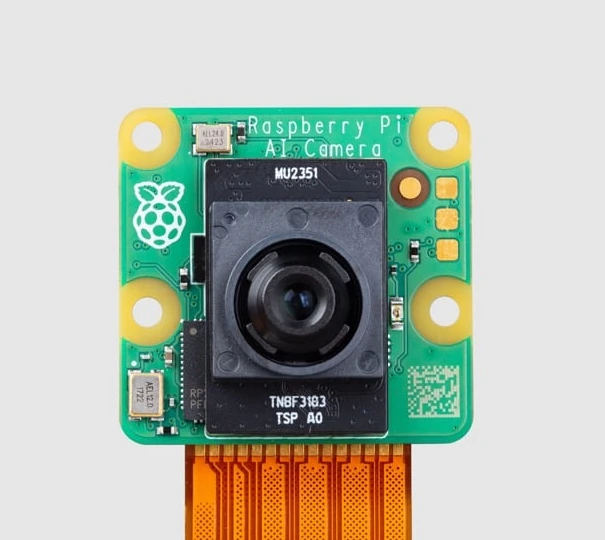 Photograph
Front of the AI Camera
The black lens assembly sits in the center of a small board, above the connector for its camera ribbon.
Visual gallery
Is this for me?
For a Pi maker who wants a compact camera with a supported neural network running inside the image sensor, leaving the Pi to handle application logic. Particularly useful when you already own a compatible Pi and do not need stereo distance or a broad GPU software environment.
What you can do with it
Proposed first result: a workbench presence indicator driven by a supplied pose model, with an “unknown” state when observations are stale or blocked. Later ideas include an interactive installation or object-presence log. The camera supplies model outputs; deciding when an event is meaningful remains your code. Manufacturer pose example
What the complete setup costs
Use the library’s $70 camera reference, not a guaranteed current checkout price. With the dated $77.50 Pi 5 2GB allowance and $40–70 for power, storage, cooling/mounting and any required cable, the illustrative setup is $187.50–217.50. A fully equipped compatible Pi owner may only need the camera and any missing cable or mount.
No paid inference service is required for the proposed local pipeline. Tax, shipping, electricity, a new development computer and optional training/conversion services are extra. Reference pricing was not freshly established from checkout on 10 Nov 2026. Customize the budget
How to start — and what you need to learn
Connect the correct camera ribbon, install the documented IMX500 packages and run a supplied model before attempting conversion. Confirm image framing and the corresponding inference output, then add a timeout to the presence rule. Basic Pi/Linux and Python skills are enough for the starting example; custom model quantization/export is a further learning step. Official guide
When another product is a better choice
Choose AI HAT+ for supported Hailo models and more accelerator headroom on Pi 5. Choose OAK-D Lite when measured depth changes the decision. An ordinary camera plus a simple image rule may be sufficient for a very constrained scene.
What we know — and what still needs testing
The sensor-to-Pi image and inference path is documented in the manufacturer explanation, reviewed 10 Nov 2026. Our presence application is untested. Measure occlusion, lighting changes, remounting and stale-result recovery rather than treating the manufacturer demo as proof of your scene. Presence test
Architecture
Behind the lens, Sony’s IMX500 captures the scene, crops and scales an input for the network, then runs inference on its integrated accelerator. A separate RP2040 manages firmware transfers and caches recently used models in 16 MB of flash. Image data and inference outputs travel together over CSI-2 to the host Pi. Raspberry Pi’s hardware overview
Documented capabilities
Raspberry Pi supplies model packages for classification, detection, segmentation and human pose. Each model defines its own output. The MobileNet SSD detector yields box and score data with little host decoding; the PoseNet demo needs additional processing on the Pi to produce a skeleton. Raspberry Pi’s IMX500 model zoo AI Camera developer guide
SDKs, APIs & extensibility
Picamera2 exposes network outputs in each completed request’s metadata. A Python application can turn these into an alert or a count without rendering an overlay. To deploy a new network, quantize and convert a supported model using Sony’s tooling, inspect its memory report, then package the converter output into a network.rpk on a Raspberry Pi. AI Camera developer guide
For a first application, keep the supplied pose network and change the rule that consumes its output. Is the marked area occupied, empty, or unknown because this frame has no fresh result? The presence indicator walks through all three states. If you already have a camera and want a host-side tracking callback, compare the AI HAT+ approach.
Limitations
The sensor can deliver a 4056 × 3040 image, but the network input is limited to 640 × 640. Firmware, network weights and working buffers share roughly 8 MiB. Optics matter too: focus is manual, with a specified near limit of 20 cm. Check whether the smallest feature needed by your model survives the crop and resize. AI Camera product brief
Privacy & data flow
The Pi receives an image stream as well as the model output. A local program can choose to persist a state change alone. Check preview, recording, debug tensor dumps and any network destinations before claiming that the assembled system keeps or transmits only metadata. Raspberry Pi’s hardware overview AI Camera developer guide