Arduino Nano 33 BLE Sense Rev2
Learn to recognize a few movements or sounds on a small sensor board. Build a first gesture controller and test it on someone new.
Which sensor board should you choose?Thingy:53 · Nano 33 BLE Sense Rev2 · Nicla Sense MECompare who each suits, what you can build, the full setup cost and how to start.Compare all three →Illustrative sequence and routes; timing is not measured.
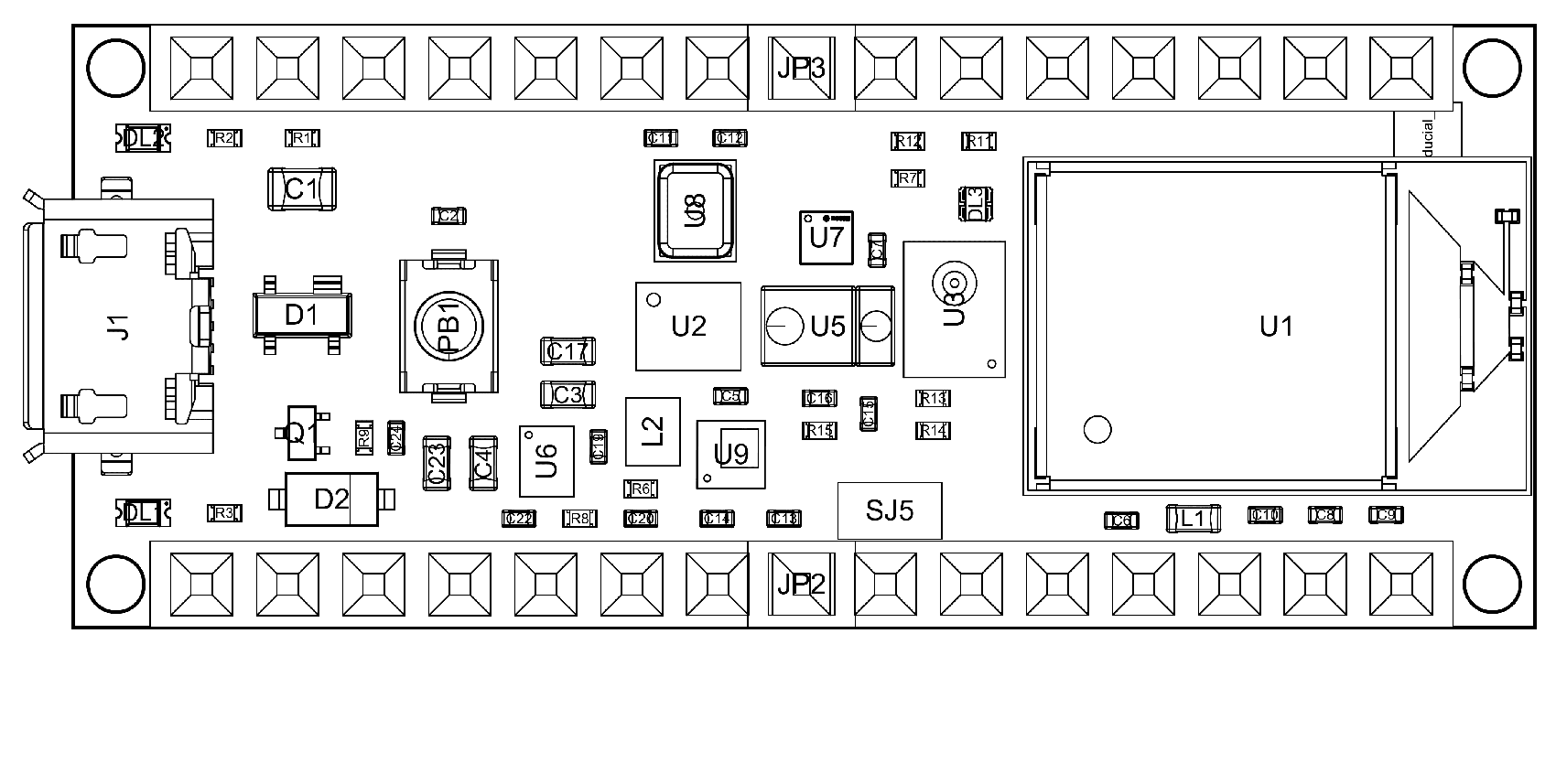
Arduino’s top-side drawing identifies the motion sensors and the module that runs the sketch. The USB connector is on the left. Animation shows logical stages, not PCB traces or measured timing. Markers below the image are outside this view.
ArduinoComponent guide
Select a number or a component to follow its role. Inspecting a component pauses the walkthrough.
U2 · BMI270
This chip supplies three acceleration axes and three angular-velocity axes. The proposed classifier uses its acceleration channels.
Is this for me?
For learners and embedded makers who want to recognize a small set of motions or sounds without a camera, Linux or continuous cloud inference. It is a good way to learn the full TinyML loop: collect examples, train a compact model, deploy it and discover where it fails.
What you can do with it
Proposed first result: distinguish two deliberate hand gestures from ordinary movement, then print the result over USB. A wearable shortcut, toy controller or simple sound classifier can follow. Start with one input stream and include a reject class; a convincing training demo is not evidence it works for another person. Gesture build
What the complete setup costs
US prices checked 14 Nov 2026: ABX00070 with headers $39.70; ABX00069 without headers $38.70. The with-headers store feed reports available; checkout/delivery is unverified. Neither price is a battery/enclosure kit.
USB gesture starter: $39.70 + $5–15 editorial data-cable/basic-mount allowance + 12 × $0 required service = $44.70–54.70 first-year incremental subtotal, reusing a development computer and its USB power. With a suitable cable/mount already owned, incremental purchase is $39.70. The headerless board saves $1 and needs no soldering for the USB-only example; wiring an external circuit may add headers/tools.
A new computer, portable power, enclosure, BLE receiver, paid training tier or hosted dashboard needs a separate quote. No paid inference API is needed; optional cloud/API usage is excluded, not assumed free. Tax, shipping, electricity and labor are excluded. Adjust the setup
How to start — and what you need to learn
Moderate for an Arduino/C++ beginner; more work for reliable recognition (editorial assessment). Install Arduino Mbed OS Nano Boards and Arduino_BMI270_BMM150 for Rev2, then upload SimpleAccelerometer. Success is a changing three-axis stream in Serial Monitor as you move the board. A charge-only cable or Rev1 sensor library can prevent that first result. No cloud account is required for this USB sensor check. Official accelerometer example
Then collect labeled windows, use the supported Edge Impulse Rev2 deployment route, and test an untouched recording session. Hosted training requires an account/internet; inference runs on the board. Expect to learn dataset design, model export, memory limits and reject-state logic before adding BLE. No hands-on setup duration is claimed. Rev2 deployment guide
When another product is a better choice
Choose XIAO Sense if a small camera and Wi-Fi are more important. Choose Nicla Sense ME for experimenting with the Bosch sensor-hub outputs. A few thresholds may solve a simple tilt switch without training a model at all.
Compare these three sensor boards by suitable users, first projects, setup cost and learning effort.
What we know — and what still needs testing
Built-in sensors and TinyML examples are documented. No accuracy or battery endurance was measured here. Hold out another person and wearing position, and count false activations during normal activity. Held-out test
Architecture
When the board moves, the BMI270 measures acceleration and rotation. A separate BMM150 measures the magnetic field. The nRF52840 in the NINA-B306 module reads the sensors, and its 64 MHz Cortex-M4F can run the deployed feature extractor and classifier. Our build uses three acceleration axes and outputs a class score over USB serial. Board topology Local deployment
Start with the sensor before collecting training data. Hold the board still, then turn it a quarter turn. Gravity should move between the axes in your serial trace. If the axes look wrong here, changing a classifier threshold later will only mask the acquisition problem. Read the sensor and test the event rule
Documented capabilities
The board can sense its own movement and also detect a hand passing close to its optical APDS-9960 sensor. These answer different questions: the wrist-wave study moves the board itself. Training it to distinguish waving from carrying requires labeled examples from that mounting position. Sensor functions Build the motion classifier
SDKs, APIs & extensibility
Select the Arduino Mbed OS Nano board package. Library Arduino_BMI270_BMM150 exposes the Rev2 motion sensors to a sketch. In Edge Impulse, exporting an Arduino library packages the trained model with its preprocessing. Choose the Rev2 accelerometer example from that export, then add a serial event or LED action to its result handler. Rev2 Arduino example Revision-specific deployment
Limitations
The 256 kB RAM budget also serves the board runtime, sensor window and temporary inference buffers. A model that fits in flash may still leave too little working memory. Watch the deployment estimate, inspect the compiled sketch size and check actual timing on the board. Rotating the board on a strap changes the axis traces even when the person repeats the same gesture. Memory budget Test mounting sensitivity
A single wave can span several overlapping windows. Treating every high score as a new gesture would trigger an action repeatedly. The build guide prints one event and waits for a low score before it can fire again. Freeze the thresholds before handing the board to a new wearer. Otherwise the test quietly becomes another round of tuning.
Privacy & data flow
The proposed sketch needs acceleration, not sound. During data collection, Edge Impulse Studio receives the labeled motion recordings you upload. With the trained Arduino library flashed, scoring can run on the board and print a label locally. Retaining or sending person-level trial logs is a separate choice; use anonymous participant IDs and document who can access the Studio project. Collection and deployment