Build a wrist-wave classifier
Proposed build · Collect acceleration, train a compact model and emit one event per sustained wave.
Device profile · Arduino Nano 33 BLE Sense Rev2 ↗This is a proposed workflow. Follow the linked official setup, then use the checks below to decide whether it works on your hardware.
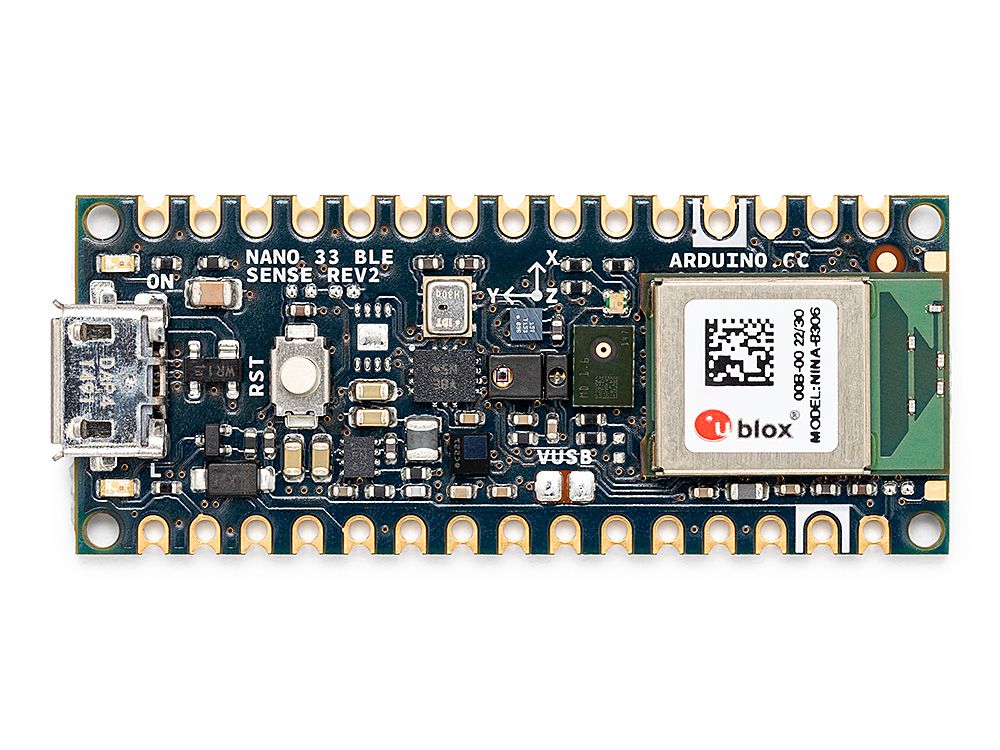
Parts and prerequisites
Intermediate. Use a Nano 33 BLE Sense Rev2, micro-USB data cable, a repeatable strap or handle, Arduino IDE with the Mbed OS Nano board package, and Arduino_BMI270_BMM150. For the training route, prepare an Edge Impulse Studio project and the board acquisition firmware. The underside revision mark matters: original Nano 33 BLE Sense accelerometer examples target different sensors. Firmware and revision guide Sensor library
1. Check the physical sensor
Install the Arduino_BMI270_BMM150 library and upload this sensor check. Open Serial Monitor at 115200. At rest, turn the board a quarter turn and check that gravity shifts between the printed axes. A successful trace verifies the input path for this unit; it does not test a classifier. Arduino library 1.2.4 example
#include <Arduino_BMI270_BMM150.h>

void setup() {
  Serial.begin(115200);
  while (!Serial) {}
  if (!IMU.begin()) {
    Serial.println("IMU initialization failed");
    while (true) { delay(1000); }
  }
  Serial.println("x_g,y_g,z_g");
}

void loop() {
  float x, y, z;
  if (IMU.accelerationAvailable() && IMU.readAcceleration(x, y, z)) {
    Serial.print(x, 3); Serial.print(',');
    Serial.print(y, 3); Serial.print(',');
    Serial.println(z, 3);
  }
}
2. Capture independent sessions
Flash Edge Impulse’s supported acquisition firmware, connect it to your Studio project, and choose the built-in accelerometer. Pick a supported rate and keep it fixed for collection and deployment. Use 10-second clips of repeated waving, normal carrying and resting, in separate labeled recordings. Include transitions, remounts and short knocks in background recordings. Assign complete people to training, validation and final test groups before making windows. Connect the board Motion acquisition
3. Train, then return the model to the Nano
Build an impulse using three acceleration axes, spectral analysis and a small classification network. Start with two-second windows; document the chosen stride, sample rate, units and class order. Tune the model and activation thresholds on the validation participants. Export Deployment → Arduino library, install its ZIP in the IDE and upload the generated nano_ble33_sense_rev2 accelerometer example. Verify the example uses the same axes, scale and cadence as training. Training workflow Select the Rev2 example
4. Count actions instead of windows
Read the score for the label named wave from the generated classification results. Pass it to this proposed handler in the sketch. Two high-score windows emit one serial event; another event requires a release below the lower threshold. Record the actual prediction interval: two windows can mean a very different delay in overlapping and non-overlapping inference. Inspect the deployed outputs
// Call once per completed inference window with the score for "wave".
// The two thresholds are proposal values; tune them on validation data.
void updateWave(float score) {
  static bool armed = true;
  static unsigned highCount = 0;
  if (score < 0.45f) armed = true;
  if (score < 0.80f) { highCount = 0; return; }
  if (armed && ++highCount >= 2) {
    Serial.println("wave");
    armed = false;
    highCount = 0;
  }
}
Expected artifact and status
Keep the exported library, sampling configuration, queue of scored events and participant split together. No Nano, deployment binary or participant trial was run by this lab. Confirm the sketch fits and characterize its event delay on the intended board. Acceptance experiment
Software check · repeated scores
We compiled the printed event handler on a desktop with serial output replaced by a console print. The invented score sequence 0.9, 0.9, 0.9, 0.6, 0.9, 0.9, 0.1, 0.9, 0.9 emitted two wave events. The middle dip to 0.6 left the handler disarmed. The later 0.1 let it trigger again. A real wearer supplies acceleration rather than scores, so the deployed classifier still needs the held-out wearer test.