Espressif ESP32-DevKitC V4
Turn a classic ESP32 into a Bluetooth volume remote for your phone. A Micro-USB cable loads the firmware, then the board sends media keys over the air. Start with the 4 MB ESP32-DevKitC-32E.
Illustrative sequence and routes; timing is not measured.
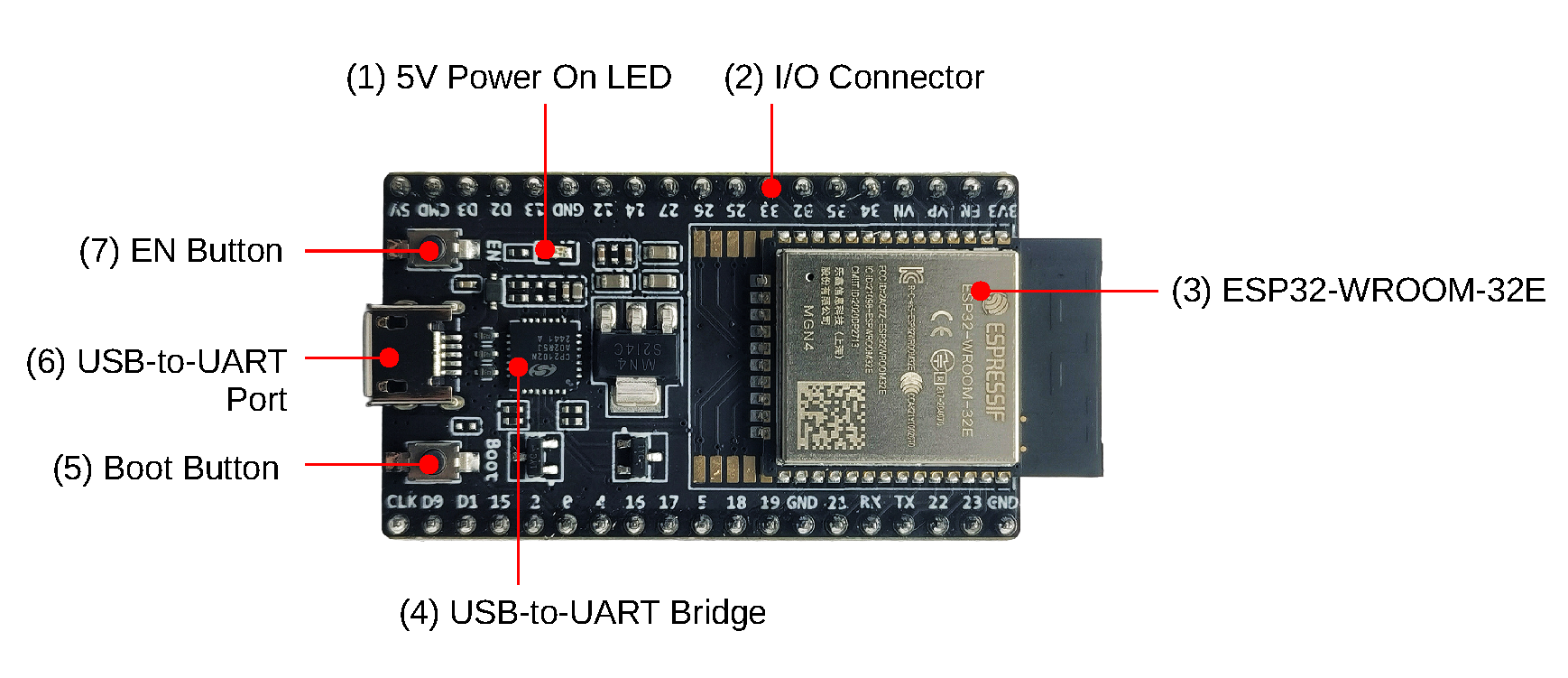
Espressif’s original annotated photograph is unchanged. The numbered controls and arrows are an Inside AI overlay. Arrows show the order of handoffs. PCB traces and radio timing are outside this view. Photograph and overlay available under CC BY-SA 4.0 (https://creativecommons.org/licenses/by-sa/4.0/).
Espressif Systems · CC BY-SA 4.0Component guide
Select a number or a component to follow its role. Inspecting a component pauses the walkthrough.
Micro-USB socket
Plug the computer’s data cable into this socket to power the board and flash the example. The paired phone receives the running example’s commands over Bluetooth.
Is this for me?
For a maker with a computer and a Bluetooth phone who wants to give a physical device a familiar control, such as changing media volume. The first build uses just the development board and a data cable.
What you can do with it
Pair the board and play audio on the phone. Espressif’s example alternates volume down and up so you can hear or see the result before wiring a single switch. Build the Bluetooth phone remote
What the complete setup costs
Mouser US listed one ESP32-DevKitC-32E at $10.20, in stock when checked on November 21, 2026. US distributor listing With a compatible phone, computer and Micro-B data cable already on hand, budget $10.20 for year one. If you need a cable, add a $3–8 editorial allowance ($13.20–18.20 total). Add an actual quote for any missing phone or computer. The sample has no required subscription or inference fee. Tax, shipping, electricity and labor are excluded.
How to start — and what you need to learn
Install ESP-IDF v6.1.1 and its ESP32 tools. Identify the board’s serial port, flash the HID device example, and use the phone’s Bluetooth settings to pair. A charge-only cable can light the power LED while leaving the serial port absent. Set up ESP-IDF
When another product is a better choice
Choose this board for a wireless accessory. For a project that specifically needs a USB keyboard or mouse connected directly to the phone, look for an ESP32-S3 board with an exposed native USB data port. The V4’s Micro-B port connects to a USB-to-serial bridge. Hardware and ordering guide · ESP32-S3 USB device support
What we know — and what still needs testing
Espressif documents the hardware and publishes the input reports. Phone model, audio route and OS settings can change the visible response. Inside AI reviewed the example and has not run it on a physical board or phone. Try the reconnect experiment
Architecture
At setup, the computer sends firmware through the Micro-B port and USB-to-UART bridge into the ESP32 module’s flash. During use, the firmware creates a Bluetooth Low Energy (BLE) Human Interface Device (HID) report, the digital equivalent of pressing and releasing a media key. The module sends it to the paired phone, which chooses how to apply it to the current audio output. Hardware and ordering guide · Versioned example firmware
Documented capabilities
The ESP32-WROOM-32E module gives this board Wi-Fi and Bluetooth. For the first build, BLE carries media keys. The example also documents a Classic Bluetooth mouse mode. An iPhone can use a compatible pointer through AssistiveTouch. Pairing a remote and pairing a mouse are separate tasks. Example modes · iPhone pointer setup
SDKs, APIs & extensibility
Once the stock example works, try replacing its timer with a momentary pushbutton on a suitable GPIO. Send one key press and release per physical press. Add switch debouncing so a single press changes the volume once. This is a proposed firmware change. Building a visual assistant adds separate tasks for obtaining a screen image with permission and choosing the next action. The starter runs without a model. Versioned example firmware Advanced Android button-click project
Limitations
A successful Bluetooth connection and a serial log line show that the firmware attempted a report. Check the volume on the phone to see whether it took effect. At either end of the volume range one direction can appear to do nothing. A media-key report carries no screen pixels or information about the active app. Versioned example firmware
Privacy & data flow
The stock remote communicates with the paired phone over Bluetooth. Its application sends media-key events and prints diagnostic events to the attached computer. It has no screen-capture, model-service or account step. Any later service that handles screen images would need its own capture permissions and data-handling choices. Versioned example firmware