Bangle.js 2
Teach a wrist gesture and make an open, programmable watch respond locally. The official training path uploads samples to Edge Impulse; the deployed model runs on the watch. Accuracy across wearers and battery life during recognition remain untested by Inside AI.
Illustrative sequence and routes; timing is not measured.
Follow the phases in order or jump to local inference. Collection, cloud training and deployment are setup; the deployed watch can classify locally. BLE forwarding and host service calls are proposed optional extensions, not implemented features. This is an Inside AI functional schematic, not a PCB map. Arrows show logical handoffs, not physical wires, electrical timing or measured latency. Software stages can share one processor. No hardware experiment has been run.
Inside AI · original schematic based on linked official documentationComponent guide
Select a number or a component to follow its role. Inspecting a component pauses the walkthrough.
KX022 motion sensor
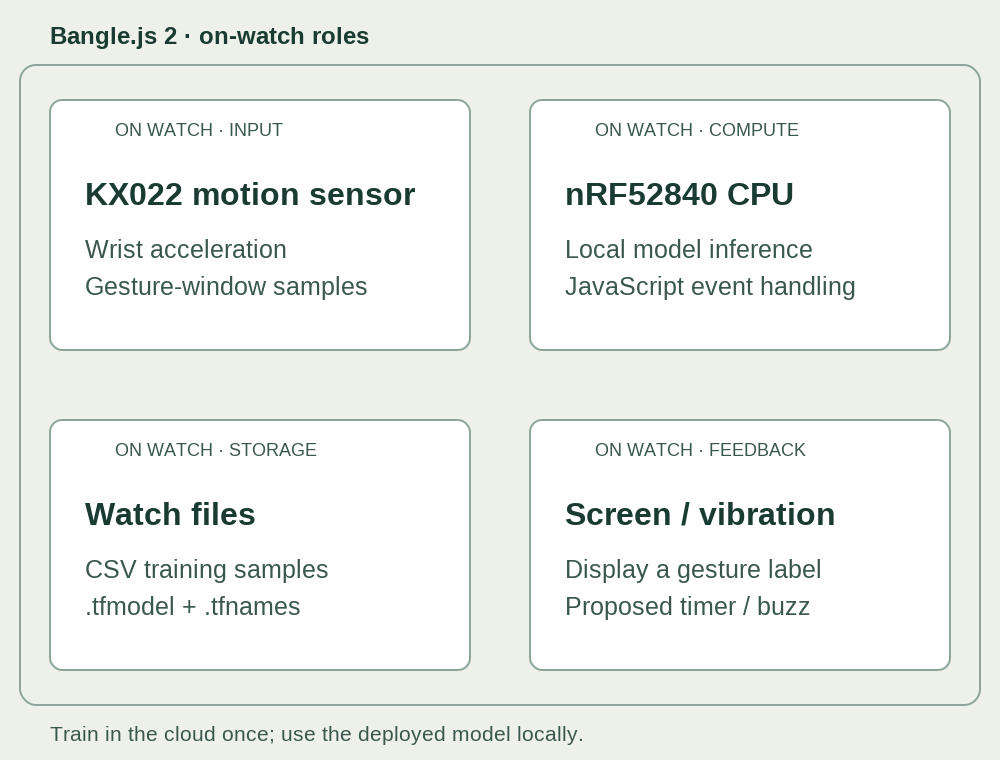
On the watch: acceleration samples describe wrist motion. Gesture-window collection for training and new windows for inference are separate uses of the same sensor. This marker is a functional role, not its physical PCB position.
Is this for me?
For JavaScript developers who want to collect motion data and deploy a small model on something they can wear. TinyML means machine learning on a small microcontroller—for example, recognizing a left wrist flick without a phone connection. Choose a health-focused wearable for validated health services; this guide is about custom interaction, not medical measurement.
What you can do with it
First connect through the official Web IDE and verify that a short JavaScript message appears. Then follow the official Gesture Test/Edge Impulse tutorial to collect left/right movements, train an int8 model (8-bit quantization reduces its memory footprint), upload .tfmodel AND .tfnames, and display the resulting aiGesture label. Our proposed extension maps one label to a timer or short vibration after the official label display works. Build guide · Official tutorial
What the complete setup costs
Exact BANGLEJS2, Espruino UK store, checked 17 Nov 2026: £99.60 displayed, £83.00 excluding tax; availability counter 237, with no colour split. This is a snapshot, not a delivery guarantee. For the first gesture project, reuse a BLE-capable computer, supported browser and USB power source; the charging cable is supplied. First-year incremental subtotal = £99.60 watch + £0 reused equipment + 12 × £0 Developer training plan + £0 inference/API usage. It is conditional on the free plan covering this small project and existing equipment being suitable. A new computer/BLE adapter/power source needs a separate quote. Checkout tax treatment may change the displayed amount; shipping, import charges, electricity and labour are excluded. No dock or replacement cable is required. Exact store · Charging and browser requirements · Training plan
How to start — and what you need to learn
You need a BLE-capable computer, a supported Web Bluetooth browser such as Chrome or Edge, JavaScript, an Edge Impulse account and an internet connection during training. Python is useful for splitting recorded CSV samples, but the tutorial also allows manual splitting. Begin with a simple screen output, then collect balanced examples, check held-out samples, and keep collection/test code in RAM as the official tutorial instructs. Model export compatibility, label order and available working memory are the main obstacles. We have not timed this workflow. Tutorial prerequisites and steps
When another product is a better choice
Choose Oura Ring 4 for a packaged health-tracking experience rather than deploying your own model. Choose Nano 33 BLE Sense Rev2 or Thingy:53 for a bench sensor experiment when wearing the device is unnecessary. Bangle.js 2 adds a case, screen, battery and JavaScript interaction; its 256 kB RAM constrains model experiments. These are editorial fit judgments, not comparative test results. Oura · Nano · Thingy:53
From a wrist flick to a head nod · Keep the method from the gesture-label project. Record labeled examples and ordinary movements, reserve a later session for testing, and count missed gestures and false triggers. On an earbud, try a nod as the target and walking or turning your head as negative examples.
With OpenEarable 2.0.1, collect fresh ear-worn motion data using its sensor tools. Check the axes and sampling rate, then train on the new recordings. For a first result, display the predicted label on the connected host. The watch’s JavaScript gesture handler and model upload are specific to Bangle.js 2. Running recognition on the earbud would require a separate firmware port. Inside AI has not tested this hardware comparison.
What we know — and what still needs testing
Hardware, model upload and aiGesture event handling are documented by Espruino. We have not trained or deployed this model on a watch, measured latency, checked cross-person accuracy or measured recognition-mode battery life. The four-week figure is manufacturer standby time, not an inference endurance result. Hardware · Documented ML workflow · Proposed experiment
Architecture
Two paths meet at the watch. Training: wrist movement → KX022 three-axis accelerometer → gesture-window samples stored on the watch → BLE transfer to a computer → CSV upload to Edge Impulse cloud training → downloaded int8 TensorFlow Lite model and class-name file → upload as .tfmodel and .tfnames. Runtime: accelerometer gesture capture → firmware preprocessing/inference on the nRF52840 Cortex-M4 → aiGesture label and raw scores → JavaScript handling → screen/vibration; sending a result over BLE is an optional application extension. Flash stores files; RAM must hold the runtime and model working buffers. There is no separate NPU in the documented design. This is a logical data path, not a PCB map or measured timeline. Official end-to-end tutorial · Components Explore the interactive data flow.
Documented capabilities
The documented tutorial accepts Bangle.js 1 or 2, records gesture examples, trains a classifier, deploys the model and prints recognized labels. The watch also exposes display, vibration, BLE and other sensors to JavaScript. A classifier emits learned categories; it does not understand arbitrary gestures without training. The intended next step is one harmless output after recognition. ML workflow · API reference
SDKs, APIs & extensibility
Use the browser REPL (an interactive JavaScript console) for sensor reads and debugging, or install a custom app through the Web IDE/App Loader. The Espruino firmware is source-available under MPL-2.0, subject to file-specific notices; custom firmware and a rear SWD debug port are documented. This does not establish that the entire watch hardware is open-source. The tutorial uses TensorFlow Lite int8 export, not an arbitrary model or full Edge Impulse SDK binary; operator support and the memory arena (the model’s temporary working area) must fit the actual firmware. Float32 export can exhaust memory and crash the watch. Firmware source/license · Model deployment
Limitations
256 kB is total chip RAM, not all available to your model. Keep model, working buffers and JavaScript allocations small. Browser/BLE compatibility matters; Safari on iPhone does not provide the default Web Bluetooth route described for desktop use. The screen is 176 × 176, not a general-purpose app display. IP67 is described for everyday use, not swimming or baths. No independently verified throughput or continuous-recognition endurance is provided here; a four-week standby claim cannot answer either. Official constraints · Float32 warning
Privacy & data flow
The proposed trained-gesture runtime can recognize locally with no BLE host connected. The official training workflow sends recorded motion samples through the computer to an Edge Impulse account; local inference does not make that cloud training private. Cloud storage, deletion and account controls must be checked for the chosen training project. The optional BLE shortcut sends recognized labels to a receiver; applications that read GPS, health data or communicate further have their own data paths. We have not audited firmware network behaviour or a training account. Training and deployment stages