Where does your voice go? Two firmware paths on the BOX-3
Say “Turn on the light” to the factory demo and the BOX-3 can light a wired LED by itself. Hold a button with Muse firmware and the same microphones can carry a question to a cloud service. Follow one utterance through each setup.
Device profile · Espressif ESP32-S3-BOX-3 (standard kit) ↗Follow the sound
Both examples use the standard ESP32-S3-BOX-3. In the factory demo the board decides which action to take. With the Muse firmware the board captures a message and plays the answer that comes back. Switching between the examples means changing the firmware.
Factory firmware: from a phrase to a lit LED
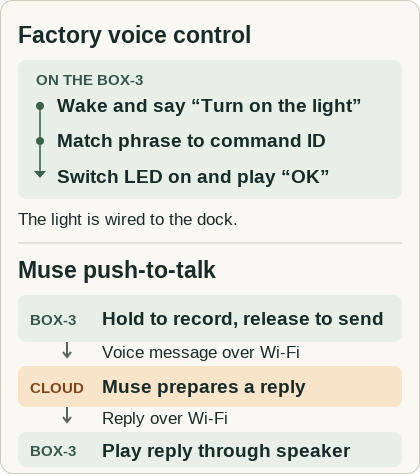
Connect the RGB LED module to the BOX-3 dock as shown in the factory guide. Say “Hi E. S. P.”, pronouncing the letters separately. The screen shows the wake phrase and the board beeps. Within six seconds, say “Turn on the light.” The documented response gives you three things to check: the command appears on screen, the wired LED lights up, and the speaker plays “OK.” Espressif’s offline demo and wiring diagram
The microphones capture the sound. On the ESP32-S3, the speech front end prepares the audio and the command recognizer matches it against the configured vocabulary. A match gives the application a command ID. The application maps that ID to the LED action. The wake phrase opens the listening window; it does not switch on the light. Recognition and control for this example can run without an internet connection. Espressif’s command-recognition guide
Muse firmware: from a button press to a spoken reply
For the first setup, save a full factory flash backup, then install the firmware for the exact BOX-3 board. Flashing replaces the factory image and its partition layout. Get a personal SDK token, enable developer mode in the Muse phone app and use the app to pair over Bluetooth and supply Wi-Fi credentials. Press BOOT/CONFIG on the box to confirm pairing. BOX-3 backup, flash and pairing guide · Muse setup and account requirements
Once connected, hold BOOT/CONFIG and ask, for example, “Why does a red LED need a resistor?” While you hold the button, the board records your voice. Releasing it sends the voice message over Wi-Fi to Muse. The service prepares a reply and the BOX-3 plays the returned audio through its speaker. The phone handles setup; the documented message path uses the board’s network connection. The question is a proposed trial. Meta’s BOX-3 controls and audio support
This sends spoken content off the device. The board guide does not specify how long the service retains it. Meta limits the token to personal, non-commercial use with your own account. If the requirement is an offline switch for a desk lamp, the factory example already demonstrates the relevant design. An open-ended spoken question is a reason to try the networked path. Gadget SDK Token Terms
Same-board comparison — hands-on test pending
Inside AI has not run this comparison on physical hardware. Meta reports checking boot, display, touch, Bluetooth pairing and audio capture on a BOX-3. Its board guide still lists intelligible recording, spoken-reply playback and Wi-Fi reconnection among the checks to complete. Meta’s hardware verification notes
Use the same BOX-3, microphone distance, room and speaker volume. Record each firmware revision, the configured language and the Wi-Fi state. Run the factory trial before reflashing. Use the documented LED wiring and keep that setup constant.
| Trial | What to record |
|---|---|
| Factory command | Say the wake phrase, then “Turn on the light.” Record screen recognition, LED change and audible acknowledgment separately. |
| Muse question | Hold BOOT/CONFIG, ask the LED question and release. Record whether the box captures the message, whether a spoken answer arrives and whether it addresses the question. |
| Internet disconnected | Keep the router and local Wi-Fi running, disconnect its internet uplink, and repeat both trials. Record any local feedback, error or silence. Reconnect and check whether a fresh request succeeds. |
For the factory demo, time the end of the command to the LED change. For Muse, time button release to the first audible reply. Record missed commands and missing replies separately. These intervals describe different jobs; a shorter interval alone cannot tell you which setup understood speech better. Existing BOX-3 offline build