Brilliant Labs Frame
Prototype a short visual cue on original Frame glasses. Start with text and a camera still, then add host-side recognition if the hardware is available.
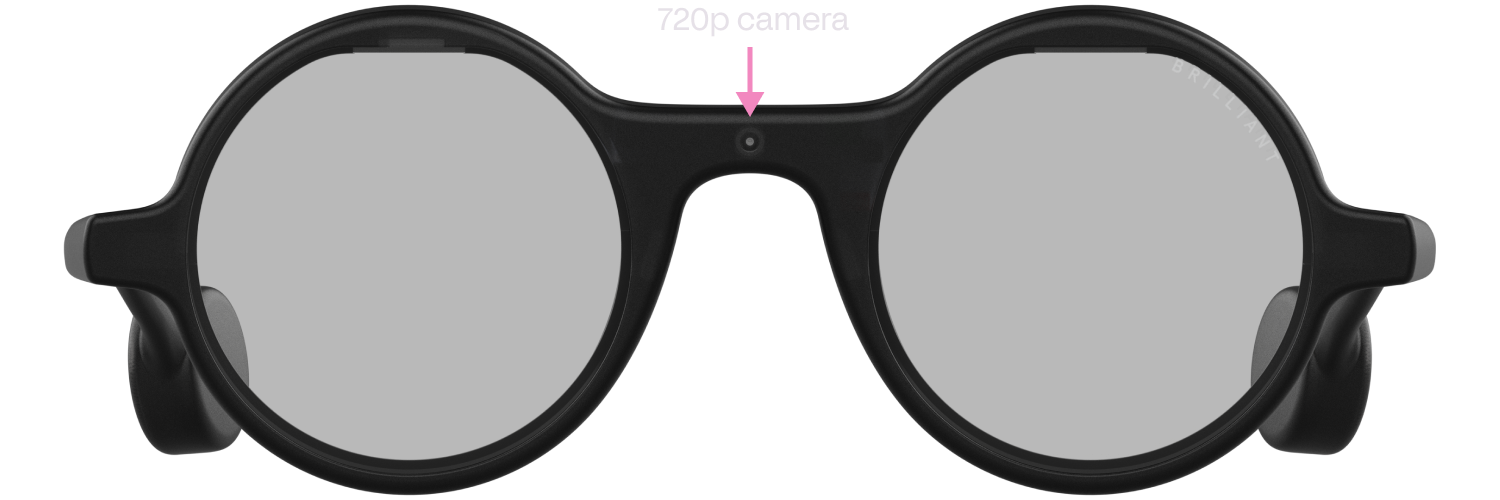 Drawing
Original Frame, front view
Official manufacturer rendering with the front camera location annotated. This is a rendered hardware illustration, not a teardown photograph.
Visual gallery
Is this for me?
For an owner of original Brilliant Labs Frame who wants to program a small glasses display and camera through a Bluetooth-connected host. It is appealing as an experimental interface; sourcing the exact hardware and working SDK combination is an early risk for a new buyer.
What you can do with it
Proposed first result: capture a large printed label, recognize it on the host, and show one short line on the glasses. Progress to a personal checklist or context cue only after text is readable and stale results clear correctly. OCR and language reasoning are host tasks in this proposed design. Label-reader build
What the complete setup costs
No current purchase total is defensible for original Frame. The manufacturer collection checked 10 Nov 2026 lists Halo at $399, which is a different product and is not a Frame quote. Obtain a Frame-specific quote including the charger, then add any missing compatible phone/computer and lens accessories. Current catalog
An equipped owner can start with $0 new hardware and local host software. Cloud OCR/LLM calls, hosting and any consumer assistant plan are separate; their current terms were not established. Enter a verified quote and chosen plan. Tax, delivery and electricity are excluded.
How to start — and what you need to learn
First send a fixed “hello” string over Bluetooth and clear the display. Next capture a still to the host; only then insert OCR between those two working steps. Learn the Frame Lua API plus the chosen host SDK. The Lua environment omits standard io/os libraries, so desktop Lua examples are not automatically portable. Lua API
When another product is a better choice
Choose a phone app if reliable everyday label reading is the goal and glasses are optional. Ray-Ban Meta offers a different first-person capture route but no display on the original model. Halo specifications and SDK support must not be substituted for Frame.
What we know — and what still needs testing
Display/camera Lua APIs were rechecked 10 Nov 2026. Stock, current consumer service terms and end-to-end performance remain unverified. Test readability, Bluetooth reconnects, OCR errors and capture-to-display delay. Label test
Architecture
Frame is a wearable input/output device around a Nordic nRF52840 microcontroller and a Lattice FPGA. The microcontroller runs Lua and Bluetooth communication. The FPGA handles camera processing and display graphics. A separate phone or computer receives captured data, runs your application or calls an AI service, then sends a compact response back into the display. A large language model is not documented as running inside the glasses. Hardware manual App architecture
Documented capabilities
The developer API exposes a camera, microphone, text/bitmap display and motion/tap events. A useful interaction is deliberate and short: request a photograph, wait for the transferred image, process it on the host, and show one answer. The sensor captures 1280 × 720 internally, but the documented API returns square JPEG crops up to 720 × 720. Capturing a scene and reliably reading small characters in it are separate problems. Lua API
SDKs, APIs & extensibility
The current Brilliant SDK supports Frame and Halo through Python, Flutter and WebBluetooth packages. Its message layer handles payload transport and companion Lua libraries; the device support table separates Frame features from Halo-only features. Build with the current brilliant- packages and matching Lua files. Older frame- examples remain useful references, but their event-loop and wire formats cannot all be mixed with the new packages. SDK Migration guide
Our proposed workbench label reader starts with the current camera and text examples. Add OCR on the host and a strict known-label lookup before sending a short result to the glasses.
Limitations
This profile covers original Frame, not its successor Halo. On 6 November 2026 UTC, the original product URL returned a not-found page and the current shop collection listed Halo. Continued documentation and SDK compatibility do not verify new Frame stock, replacement parts or a future support commitment. Confirm those directly before planning a purchase. Current collection
The display has a small field of view, and Bluetooth transfer, camera exposure, host processing and rendering all contribute to delay. The plain Lua text API does not wrap automatically. The SDK marks click events and audio-activity detection as Halo-only; do not design an original Frame project around them. Lua reference Device support
Privacy & data flow
An application defines what crosses the glasses-to-host boundary and whether the host forwards it to a remote model. For the proposed bench reader, use consenting participants, fictional labels and capture only on request. Run OCR locally for the first trial, keep image bytes in memory, and log request IDs and timings rather than photographs. Those are proposed application choices, not a privacy guarantee of every Frame app. BLE bonding protects the association with a host; changing hosts requires the documented unpairing procedure. Bluetooth pairing