Capture your first contact image with DIGIT
Make a three-frame record of one touch. The capture calls follow the official Python SDK. This desk exercise has not been run by Inside AI.
Device profile · GelSight DIGIT Tactile Sensor (DG-01) ↗Simulated images
Compare the contact frames

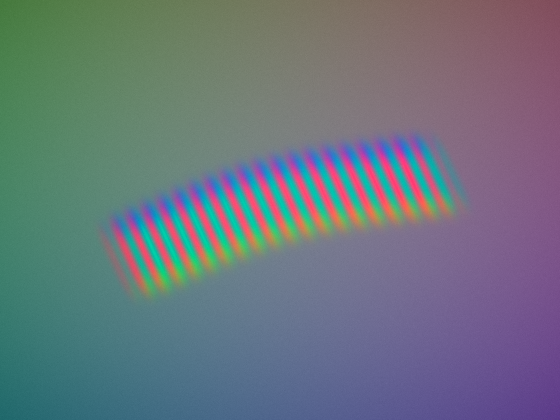
The coin edge produces a narrow diagonal imprint. Follow the row of ridges across the middle. The surrounding gel keeps its baseline appearance.
Inside AI · synthetic gel images · Sensor principle ↗
This is a proposed workflow. Follow the linked official setup, then use the checks below to decide whether it works on your hardware.
Find the fingertip
Connect a single DG-01 with a USB data cable. In a fresh Python environment install digit-interface. Run the snippet and copy the serial number it prints. If the list is empty, check the cable, USB port and Linux device permissions. Official setup and udev rule
from digit_interface import DigitHandler
print(DigitHandler.list_digits())
Save a baseline, an imprint and a release
Supply the printed serial number. For each prompt, hold that condition steady and press Enter. Keep the same camera settings for all three files. The wrapper adds local PNG saving to the documented single-frame example.
from digit_interface import Digit
import cv2

sensor = Digit(input("DIGIT serial number: ").strip())
sensor.connect()
try:
    for name, prompt in [("rest", "Leave gel clear"), ("contact", "Hold coin edge lightly against gel"), ("released", "Lift coin away")]:
        input(prompt + ", then press Enter: ")
        frame = sensor.get_frame()
        if frame is None or not cv2.imwrite(name + ".png", frame):
            raise RuntimeError("Could not capture " + name)
finally:
    sensor.disconnect()
Read the contact patch
Open the three files side by side. Look for an imprint confined to the coin edge during contact, then compare the released surface with the original baseline. If the whole image shifts, steady the sensor and repeat. To identify the commercial unit or see the original project demonstration, follow the source links. DG-01 product photo · GelSight · DIGIT demonstration · Roberto Calandra The slip-warning experiment is proposed and untested.